
Chrome wallet · 2.0.0
Your wallet lives on this device.
Create a secret phrase here, or import one you already keep. Send, receive, swap, and approve sites from the Avero popup — not from a page that asks for the phrase.
Chrome, Android, and iOS listings are opening. support@averowallet.com
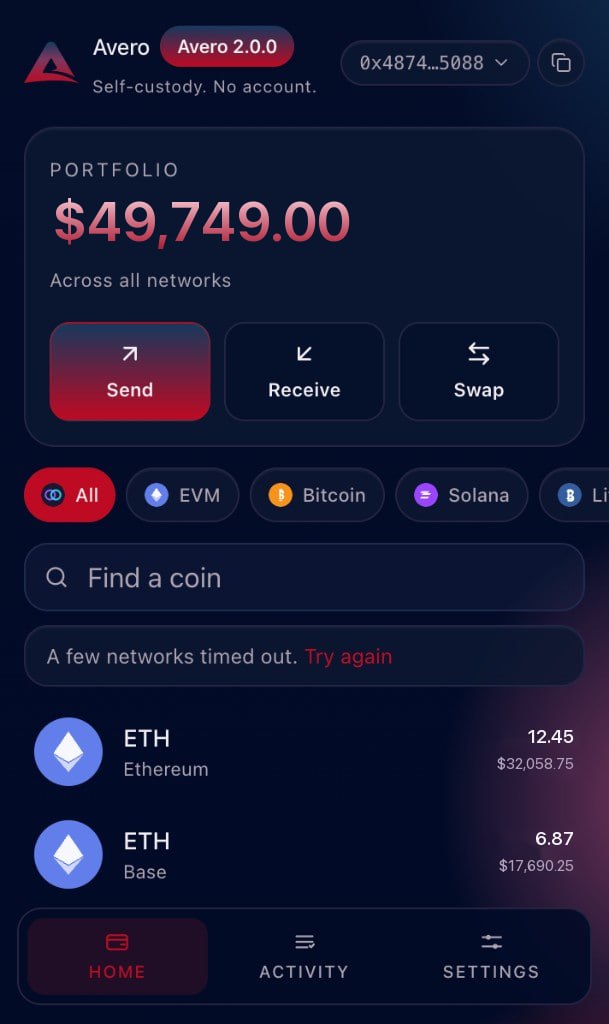
On this device
The phrase never rides with a website request.
Avero does not keep a cloud copy. The unlock password only decrypts the vault in memory on this device.
Write it offline
Create 12 or 24 words, or import a phrase you already control. Paper or a password manager you own — not a screenshot.
Unlock the popup
Home shows balances on one screen. Filter a network, search an asset, then send, receive, or swap.
Confirm in Avero
A site can ask to connect. The request opens in the toolbar. Nothing moves until you press confirm.
Coverage
One phrase. The networks you actually use.
Bitcoin, Solana, TON, Tron, XRP, Sui, Aptos, Cosmos, UTXO coins, and EVM chains share the same secret. Add a custom RPC when a default is not enough.
All stacks
BitcoinEthereumSolana
BaseTONTronXRP
SuiAptosCosmosLitecoin
DogecoinBitcoin CashZcashArbitrum
OptimismPolygonBNB ChainCustom EVM
Vault
Confirm here. Ignore anyone who asks for the phrase.
Encryption stays local
PBKDF2 and AES-256-GCM wrap the vault on this device. Avero will not ask for the secret phrase on a website or by email.
Quotes in the popup
LI.FI on EVM, Tron, and Sui. Jupiter on Solana. UTXO chains send and receive. You sign the route in Avero.
Sites get a standard connect
EVM via EIP-1193 and EIP-6963. Solana and Sui via Wallet Standard. TronLink, TonConnect, Aptos, and Cosmos Hub when none is already present.
Support cannot unlock it
Write to support@averowallet.com for install and product questions. We cannot restore a lost phrase or password.
Privacy
No account. Nothing to sell.
Avero does not create a login and does not keep a cloud copy of your vault. The policy below is the same document Chrome Web Store will list — what stays on this device, and what a network request can reveal.
- On this device Encrypted vault, settings, connected-site permissions, local history.
- Not collected Secret phrase, private keys, unlock password, browsing, advertising IDs.
- When you transact The RPC or quote service you use can see the addresses in that request.
- This website No cookies, no analytics pixels, no marketing profile.
Apps
Get Avero when each store opens
Listings are in review. These rows stay here so you know where the popup, APK, and iOS build will land.